

DS3231 Real-Time Clock
The ds3231 component provides support for the Maxim/Analog Devices DS3231 real-time clock (RTC). The DS3231
is a temperature-compensated RTC accurate to a few parts per million, and is found on inexpensive breakout
boards such as the ZS-042.
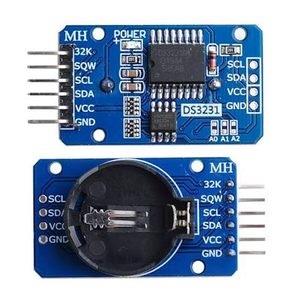
This component is an I²C hub. It owns the chip and provides:
- the
timeplatform, to keep the system clock across reboots and power loss, - the
sensorplatform for the on-die temperature, - the
binary_sensorplatform for the alarm and oscillator-stop flags, - both hardware alarms with triggers and actions,
- control of the INT/SQW square-wave output, the 32 kHz output and the aging offset.
The I²C bus must be set up first.
# Example configuration entryds3231: id: ds3231_hubConfiguration Variables
Section titled “Configuration Variables”- id (Optional, ID): The ID to use for referencing this hub from the platforms and actions.
- address (Optional, int): The I²C address of the chip. Defaults to
0x68. - i2c_id (Optional, ID): The ID of the I²C bus when using multiple buses.
- interrupt_pin (Optional, Pin Schema): The GPIO connected to
the INT/SQW pin of the chip. The pin is open drain and active low, so it needs a pull-up (most breakout boards
have one). With an interrupt pin the alarms are handled as soon as they fire instead of being polled. Can’t be
combined with
square_wave_frequency. - square_wave_frequency (Optional, frequency): Use the INT/SQW pin as a square-wave output instead of the
alarm interrupt. One of
1Hz,1024Hz,4096Hzor8192Hz(1.024kHzand the other kHz spellings work too). If not set, INT/SQW is the alarm interrupt output. - battery_backed_square_wave (Optional, boolean): Keep the square wave running while the chip runs from its backup battery. If not set, the chip setting is left unchanged.
- output_32khz (Optional, boolean): Enable or disable the 32 kHz output pin. The chip enables it on power-up; if not set, the chip setting is left unchanged.
- aging_offset (Optional, int): Fine-tune the oscillator, from
-128to127. Each step is about 0.1 ppm at 25 °C; positive values slow the clock down. If not set, the chip setting is left unchanged. - auto_clear_alarms (Optional, boolean): Clear an alarm flag on the chip as soon as the alarm has been
handled, which also releases the INT/SQW line. When
false, the flag stays set until it is cleared with theds3231.clear_alarmaction. Defaults totrue. - alarm_check_interval (Optional, Time): How often to poll the alarm
flags. Without an
interrupt_pinthis is how alarms are detected; with one it is a fallback that picks up a missed interrupt. Only used when aninterrupt_pin, anon_alarm_*trigger or an alarm binary sensor is configured. Defaults to1s. - on_alarm_1 (Optional, Automation): Actions to run when alarm 1 fires.
- on_alarm_2 (Optional, Automation): Actions to run when alarm 2 fires.
The chip has a fixed address, so more than one DS3231 needs separate I²C buses (or separate channels of an
I²C multiplexer); give each chip its own entry with a distinct id and i2c_id.
Alarms
Section titled “Alarms”The DS3231 has two alarms that are stored on the chip and survive a reboot of the ESP as long as the chip has
power or a backup battery. Alarm 1 has a resolution of one second, alarm 2 of one minute (it fires at second
00). Each alarm has a mode that sets which parts of the time have to match:
| Mode | Alarm 1 fires … | Alarm 2 fires … |
|---|---|---|
every_second | every second | not available |
every_minute | every minute, when the seconds match | every minute, at second 00 |
hourly | every hour, when minutes and seconds match | every hour, when the minutes match |
daily | every day, at hour:minute:second | every day, at hour:minute |
monthly | on day_of_month of every month, at that time | on day_of_month, at that time |
weekly | on day_of_week of every week, at that time | on day_of_week, at that time |
The chip compares the alarms against its own clock, which holds UTC time when it is set with the
ds3231.write_time action. Alarm times are therefore in
UTC. Days of the week are numbered 1 (Sunday) to 7 (Saturday), as in the time
component.
An alarm only triggers on_alarm_1/on_alarm_2 and pulls the INT/SQW line low while it is enabled. An alarm
that already fired while the ESP was off is reported once when the ESP starts.
on_alarm_1 and on_alarm_2 Triggers
Section titled “on_alarm_1 and on_alarm_2 Triggers”These automations run each time the alarm fires. With an interrupt_pin they run right away; the flags are
also polled every alarm_check_interval, which is the only way alarms are seen without an interrupt pin.
ds3231: interrupt_pin: number: GPIOXX mode: input: true pullup: true on_alarm_1: - switch.turn_on: relay on_alarm_2: - switch.turn_off: relayds3231.set_alarm_1 Action
Section titled “ds3231.set_alarm_1 Action”Program alarm 1 and enable or disable it. The time fields and enabled can be templates.
on_...: - ds3231.set_alarm_1: mode: daily hour: 6 minute: 30 second: 0Configuration variables:
- id (Optional, ID): The ID of the
ds3231hub. - mode (Required, string): One of the alarm modes.
- second (Optional, int, templatable):
0to59. Defaults to0. - minute (Optional, int, templatable):
0to59. Defaults to0. - hour (Optional, int, templatable):
0to23. Defaults to0. - day_of_month (Optional, int, templatable):
1to31. Required inmonthlymode. - day_of_week (Optional, int, templatable):
1(Sunday) to7(Saturday). Required inweeklymode. - enabled (Optional, boolean, templatable): Enable the alarm. Defaults to
true.
ds3231.set_alarm_2 Action
Section titled “ds3231.set_alarm_2 Action”Program alarm 2. Same as ds3231.set_alarm_1, without second and without the
every_second mode.
on_...: - ds3231.set_alarm_2: mode: weekly day_of_week: 2 # Monday hour: 22 minute: 15ds3231.enable_alarm and ds3231.disable_alarm Actions
Section titled “ds3231.enable_alarm and ds3231.disable_alarm Actions”Enable or disable an alarm without changing its time. Enabling an alarm first clears a match from while it was disabled, so the trigger only fires for the next one.
on_...: - ds3231.enable_alarm: alarm: 1 - ds3231.disable_alarm: alarm: 2Configuration variables:
- id (Optional, ID): The ID of the
ds3231hub. - alarm (Required, int, templatable):
1or2.
ds3231.clear_alarm Action
Section titled “ds3231.clear_alarm Action”Clear the flag of an alarm, which releases the INT/SQW line. Only needed with auto_clear_alarms: false.
on_...: - ds3231.clear_alarm: alarm: 1Configuration variables: the same as for ds3231.enable_alarm.
ds3231.is_alarm_triggered Condition
Section titled “ds3231.is_alarm_triggered Condition”True while the flag of the given alarm is set on the chip.
on_...: - if: condition: ds3231.is_alarm_triggered: alarm: 1 then: - ds3231.clear_alarm: alarm: 1ds3231.enable_square_wave and ds3231.disable_square_wave Actions
Section titled “ds3231.enable_square_wave and ds3231.disable_square_wave Actions”Switch the INT/SQW pin to a square-wave output, or back to the alarm interrupt. Enabling the square wave isn’t
possible when an interrupt_pin is configured.
on_...: - ds3231.enable_square_wave: frequency: 1Hz - ds3231.disable_square_wave: ds3231_hubConfiguration variables:
- id (Optional, ID): The ID of the
ds3231hub. - frequency (Required, frequency): One of
1Hz,1024Hz,4096Hzor8192Hz. (ds3231.enable_square_waveonly)
ds3231.set_32khz_output Action
Section titled “ds3231.set_32khz_output Action”Turn the 32 kHz output on or off.
on_...: - ds3231.set_32khz_output: state: falseConfiguration variables:
- id (Optional, ID): The ID of the
ds3231hub. - state (Required, boolean, templatable):
trueto enable the output.
ds3231.set_aging_offset Action
Section titled “ds3231.set_aging_offset Action”Change the aging offset at runtime. A temperature conversion is started so that it takes effect right away.
on_...: - ds3231.set_aging_offset: offset: !lambda return id(aging_number).state;Configuration variables:
- id (Optional, ID): The ID of the
ds3231hub. - offset (Required, int, templatable):
-128to127.
ds3231.force_temperature_conversion Action
Section titled “ds3231.force_temperature_conversion Action”Trigger an immediate temperature conversion instead of waiting for the chip’s automatic 64-second cycle. The result is also used to re-tune the oscillator.
on_...: - ds3231.force_temperature_conversion: ds3231_hubConfiguration variables:
- id (Required, ID): The ID of the
ds3231hub.
Hardware Notes
Section titled “Hardware Notes”- On common breakout boards (ZS-042 and similar) a separate AT24C32 EEPROM is fitted at address
0x57. It is not used by this component but will show up in an I²C scan. - Many ZS-042 boards contain a charging circuit for a rechargeable LIR2032 cell. With a non-rechargeable CR2032, remove the charging resistor or diode.
- To save power, disable
output_32khzif the 32K pin is not used.