

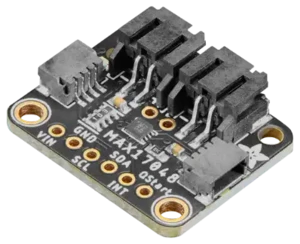
Analog Devices MAX17048 battery fuel gauge
The max17048 platform allows you to monitor the remaining capacity of a lithium-ion battery with an Analog
Devices MAX17048 or MAX17049 fuel gauge
(datasheet) in
ESPHome. The ModelGauge algorithm in the chip tracks the state of charge over a wide range of charge and
discharge profiles without a sense resistor or relearn cycles. The MAX17048 monitors one cell and the MAX17049
two cells in series; the two chips are otherwise the same. It uses the I²C Bus for
communication.
NOTE
The voltage is scaled for the MAX17048. On a MAX17049, whose voltage step is doubled for its two cells,
battery_voltage is therefore the average voltage per cell rather than the pack voltage; a multiply: 2 filter
gives the pack voltage.
# Example configuration entrysensor: - platform: max17048 id: max17048_id battery_voltage: name: Battery Voltage battery_level: name: Battery LevelConfiguration variables
Section titled “Configuration variables”- battery_voltage (Optional): The cell voltage in volts. All options from Sensor.
- battery_level (Optional): The state of charge in percent. All options from Sensor.
- rate (Optional): The rate at which the cell is charging or discharging, in percent per hour, positive while charging. All options from Sensor.
- address (Optional, int): The I²C address of the device. Defaults to
0x36. - update_interval (Optional, Time): How often to read the gauge.
Defaults to
60s.
If the gauge does not answer when the device starts, for example on an Adafruit Feather that switches the I²C power on after boot, the component sets a warning and tries again on every update until the gauge answers. The gauge’s CONFIG register keeps its value while the battery is connected; a value left by other firmware is logged as a warning and written back to the power-up default.
max17048.sleep_mode Action
Section titled “max17048.sleep_mode Action”This action puts the gauge into sleep mode, where it draws less than 1 µA. Call it just before the device enters deep sleep. When the device starts again, the component wakes the gauge.
on_...: then: - max17048.sleep_mode: max17048_id - deep_sleep.enter: id: deep_sleep_1 sleep_duration: 20minConfiguration variables:
- id (Required, ID): The ID of the MAX17048 sensor.
NOTE
While the gauge sleeps it stops measuring, so the sensors keep publishing the last values. Only a restart of the
device wakes it, so only call sleep_mode when the device is about to enter deep sleep.
The gauge also cannot track self-discharge while it sleeps. The datasheet recommends its automatic hibernate mode, which draws about 3 µA and needs no action, for devices that can afford that current.
Waking from sleep can raise a false low-battery alert in the gauge; the component clears it shortly after waking.